Familiar Pokémon names
Choose Korean in the game settings, with official Korean names for Pokémon, moves, and abilities.
 PokéSurvivor Korean Patch
한국어
POKÉSURVIVOR · CHROME EXTENSION
Korean names, menus, and move descriptions,
with practical tools for every run.
Chrome Web Store installation · Automatic updates
Choose Korean in the game settings, with official Korean names for Pokémon, moves, and abilities.
A 1.5× player HUD and tooltips for moves and held items. Hover over linked moves to see their descriptions together.
Adjust your effects and party effects separately, and check tier rankings for the Pokémon you own.
Open Chrome Web Store, choose Add to Chrome, then reload the game. Chrome delivers approved updates automatically.
chrome://extensions in Chrome and turn on Developer mode.manifest.json directly inside it.Keep the installed folder in place. To update a ZIP installation, replace its files with the latest ZIP, then reload the extension and game.
When moving from ZIP to the store version, disable the old extension. Do not run both installations together.
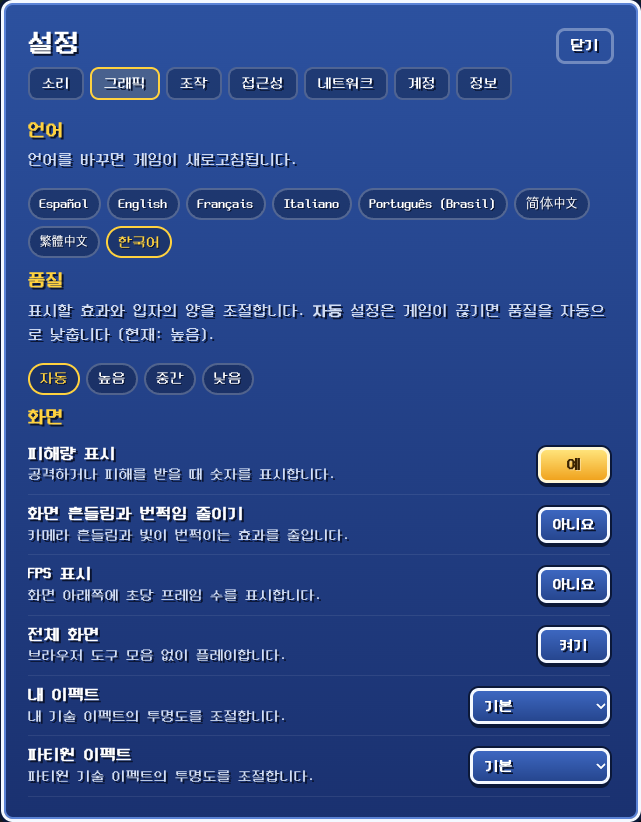
Choose Korean or another language under Settings → Graphics → Language. Changing the language reloads the game.
Chrome automatically delivers approved updates to store installations. ZIP installations require replacing files with the latest ZIP. Reload any open game tab after an update.
If Windows blocks inbound Chrome UDP, the optional Windows LAN helper can allow a trusted CIDR. Extract it, read the README, and run as administrator. Review the suggested range and rule scope, then type YES to apply.
The persistent Chrome rule applies to all network profiles, not a specific Wi-Fi name or game site. On both PCs enable Settings → Network → Direct P2P connection in the game and rejoin. Choose menu option 2 in the helper to remove its CIDR rules.